- Your old device and its passcode
- Your Apple or Google account password
- About 20 minutes
Official links
Who qualifies
Anyone with an old phone, tablet or computer. Trade-in credit is for working devices; recycling takes almost anything.
What you get
Store credit or a gift card for working devices, or free, safe recycling.
After the free part
Usually free. Best Buy recycles most electronics free (up to 10 items per household per day, with limits by type), but charges $29.99 each for most TVs and monitors; there is no drop-off fee in California, Connecticut or Hawaii.
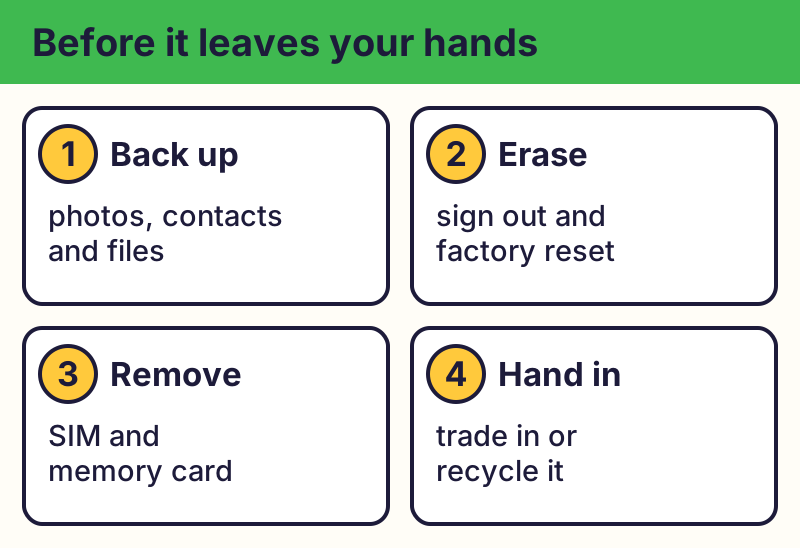
Back up first
Save the photos, contacts and files you want to keep to the cloud or to your new device before you erase anything.
Sign out and erase
📱 iPhone / iPad: Settings > General > Transfer or Reset iPhone > Erase All Content and Settings. This also signs you out of your Apple Account and removes Activation Lock.
🤖 Android: Remove your Google account, then do a factory reset in Settings (often under System > Reset options; it varies by phone).
Windows 11: Settings > System > Recovery > Reset PC > Remove everything. Mac: System Settings > General > Transfer or Reset > Erase All Content and Settings (newer Macs).
Remove the SIM and memory card
Take out the SIM and any memory card. If you use an eSIM, ask your carrier before you erase it.
Trade in or recycle
- Trade-in: phone makers, carriers and big stores often give credit for working devices. Get a quote on their official website.
- Free recycling: many makers and stores take old electronics free. The EPA recommends certified (R2 or e-Stewards) recyclers.
- Don't put devices or lithium batteries in the trash or curbside recycling.
Spot trade-in scams
⚠️ Careful: Be careful with strangers or unknown "buyers" who ask for your passcode, account password or a code texted to you. Never hand over a device that still has your accounts on it. Real free programs never ask for your card or bank details to give you something free, never pressure you with a countdown, and never come from a random text, pop-up or caller. Go to the official website yourself instead of tapping a link.
Compare at a glance
| Option | What you get | Before you go |
|---|---|---|
| Maker or carrier trade-in | Credit toward a new device | Erase it and turn off Find My |
| Store drop-off (like Best Buy) | Free recycling for most items | Check limits and TV fees |
| Certified recycler (R2, e-Stewards) | Safe recycling | Erase it; remove the SIM |
| Battery drop-off | Safe battery recycling | Tape the battery ends |
The real addresses are apple.com/shop/trade-in, epa.gov. Type it yourself or use the buttons above. Fake sites use names like phone-cash-instant-buyback.net (examples only, do not visit). A real free program never asks for your card or bank details to “unlock” it.
A "buyer" who asks for your passcode or a code texted to you is trying to take over your accounts.
Why we trust this: Wipe steps come from Apple, Google and Microsoft; recycler certifications (R2, e-Stewards) are the ones the EPA recommends. Best Buy limits from its recycling page, October 2026.
Related game: Safe or Risky?. Related explainer: What is a data breach, and what should I do? .