- Your iPhone, Mac, Android phone or Chrome browser
Official links
Who qualifies
Anyone with an iPhone, iPad, Mac, Android phone or the Chrome browser. Bitwarden works on any device.
What you get
A safe place for passwords and passkeys that creates strong passwords and fills them in for you.
After the free part
Free. Apple's and Google's are built in. Bitwarden's free plan covers one person on unlimited devices.
Apple: the Passwords app
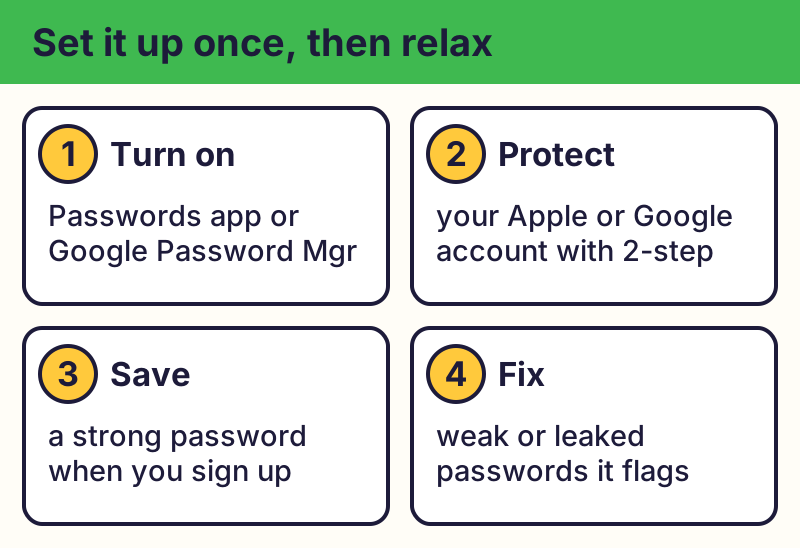
On iPhone and iPad with iOS 18 or later, and on Mac with macOS Sequoia or later, the free Passwords app keeps your passwords, passkeys and verification codes. Turn on iCloud Keychain to sync across your Apple devices.
Google Password Manager
Built into Chrome and Android and saved in your Google Account. See your passwords at passwords.google.com. On iPhone you can choose Chrome to fill passwords in Settings.
Let it make strong passwords
When you create a new account, accept the suggested strong password. Both apps warn you about passwords that are weak, reused or leaked.
Protect the manager itself
Your Apple or Google account now guards everything, so give it a strong password and turn on two-step verification. For a full walk-through, see Set up a password manager.
Spot fake password alerts
⚠️ Careful: Emails or texts saying your passwords were leaked and asking you to sign in through a link are phishing. Open the Passwords app or passwords.google.com yourself. Real free programs never ask for your card or bank details to give you something free, never pressure you with a countdown, and never come from a random text, pop-up or caller. Go to the official website yourself instead of tapping a link.
Compare at a glance
| Manager | Works on | Cost |
|---|---|---|
| Apple Passwords | iPhone, iPad, Mac (and Windows via iCloud) | Free |
| Google Password Manager | Android, Chrome, iPhone | Free |
| Bitwarden | Any phone, computer or browser | Free plan; paid extras |
The real addresses are passwords.google.com, bitwarden.com. Type it yourself or use the buttons above. Fake sites use names like passwords-google-security.com, bitwarden-free-download.net (examples only, do not visit). A real free program never asks for your card or bank details to “unlock” it.
Why we trust this: Apple and Google document their managers on their own help pages; Bitwarden is open source and publishes independent security audits.
Related game: Password Strength Challenge. Related explainer: Passwords, passkeys and 2FA, explained .