- A computer, tablet or phone
- A free Microsoft or Google account (for the web apps)
Official links
Who qualifies
Anyone. The web apps need a free Microsoft or Google account; LibreOffice needs no account. Apple's Pages, Numbers and Keynote are free on Apple devices.
What you get
Everyday documents, spreadsheets and slides, and you can open and save Word and Excel files.
After the free part
Free. Microsoft's paid desktop apps start with Microsoft 365 Personal at $99.99 a year, but most people don't need them.
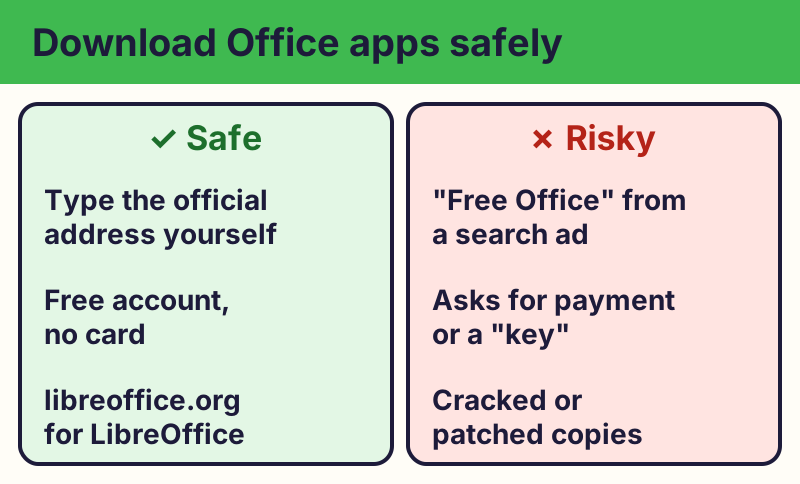
Microsoft's free web apps
Sign in at Microsoft365.com with a free Microsoft account to use Word, Excel and PowerPoint in your web browser. They have fewer features than the paid desktop apps and need an internet connection. Files save to OneDrive (5 GB free).
Google Docs, Sheets and Slides
With a free Google Account, go to docs.google.com. Files save to Google Drive, and they can open and save Word and Excel files.
LibreOffice for your computer
LibreOffice is a free office suite you install on Windows, Mac or Linux, and it works without the internet. Download it only from libreoffice.org.
Which should I pick?
- Need to share and work together? Google Docs or Microsoft's web apps.
- No internet, or want an app on your computer? LibreOffice.
- Someone sent you a Word file? Any of the three can open it.
Download safely
⚠️ Careful: Search ads and look-alike sites sometimes offer "free Office" downloads that come with malware or ask for payment. Type the official address yourself. Real free programs never ask for your card or bank details to give you something free, never pressure you with a countdown, and never come from a random text, pop-up or caller. Go to the official website yourself instead of tapping a link.
Compare at a glance
| App | Works offline? | Account? | Best for |
|---|---|---|---|
| Microsoft 365 web apps | No | Microsoft account | Word and Excel files |
| Google Docs, Sheets, Slides | Partly | Google Account | Sharing and teamwork |
| LibreOffice | Yes | None | No internet, older PCs |
| Apple Pages, Numbers, Keynote | Yes | Apple Account | iPhone, iPad and Mac |
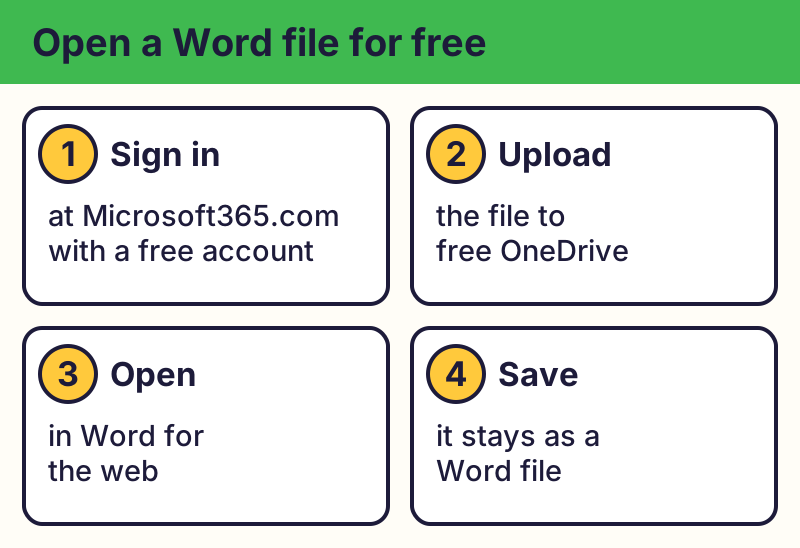
The real addresses are Microsoft365.com, docs.google.com, libreoffice.org. Type it yourself or use the buttons above. Fake sites use names like libre-office-free.download, office365-free-key.com (examples only, do not visit). A real free program never asks for your card or bank details to “unlock” it.
Why we trust this: Feature limits come from Microsoft's own comparison page; downloads from the official LibreOffice and Apple pages, checked October 2026.
Related game: Safe or Risky?. Related explainer: What does “the cloud” really mean? .