- Your computer or phone
Official links
Who qualifies
Anyone with Windows 10 or 11, a Mac, an iPhone or an Android phone.
What you get
Real-time malware protection that updates itself, with no subscription.
After the free part
Free. You don't need to buy antivirus for everyday home use.
Windows: Windows Security
Windows 10 and 11 include Microsoft Defender Antivirus free. Open Start, search Windows Security, then Virus & threat protection to check it's on or run a Quick scan.
Mac: built-in protection
macOS has built-in malware protection (XProtect and Gatekeeper) that updates automatically. Keep macOS updated and get apps from the App Store or developers you trust.
Phones
📱 iPhone / iPad: Keep iOS updated and install apps only from the App Store.
🤖 Android: Keep Google Play Protect on (Play Store > profile picture > Play Protect) and install apps from Google Play.
Spot scareware
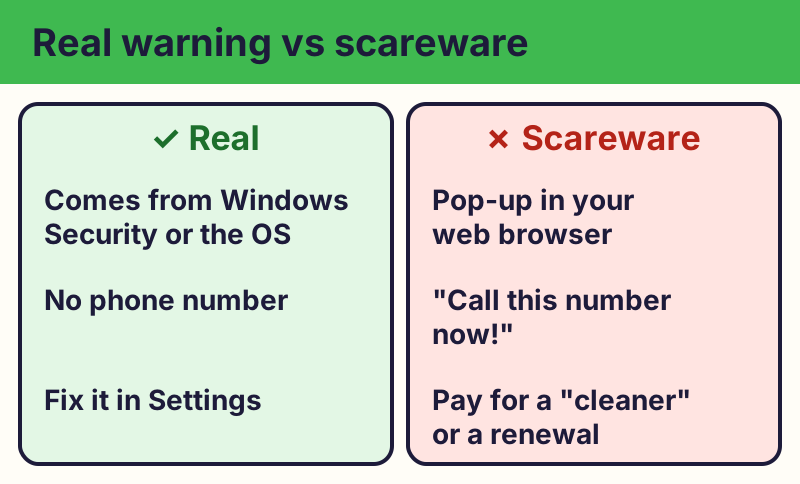
⚠️ Careful: Pop-ups that say your device is infected and tell you to call a number or buy a cleaner are scams. Real security warnings don't ask you to call a phone number. Close the browser tab (or restart) and don't call. Real free programs never ask for your card or bank details to give you something free, never pressure you with a countdown, and never come from a random text, pop-up or caller. Go to the official website yourself instead of tapping a link.
Compare at a glance
| Device | Built-in protection | Where to check |
|---|---|---|
| Windows 10 and 11 | Microsoft Defender Antivirus | Start › Windows Security |
| Mac | XProtect and Gatekeeper | Keep macOS updated |
| iPhone and iPad | App Store review and updates | Settings › General › Software Update |
| Android | Google Play Protect | Play Store › profile › Play Protect |
Want a second opinion on Windows? Bitdefender Antivirus Free uses the same protection engine that earns top marks from AV-TEST and AV-Comparatives, with no data-selling record. Download it only from bitdefender.com, and use one antivirus at a time.
What we left out, and why
- Avast and AVG: In 2024 the FTC ordered Avast (which owns AVG) to pay $16.5 million and banned it from selling browsing data for advertising.
- Kaspersky: The U.S. Commerce Department banned Kaspersky software sales in 2024, and it stopped updates for U.S. customers in September 2024.
- Free VPN and "cleaner" apps: Many are unsafe or sell your data. You don't need them.
The real addresses are support.microsoft.com, av-test.org. Type it yourself or use the buttons above. Fake sites use names like windows-defender-alert.com, microsoft-security-renew.net (examples only, do not visit). A real free program never asks for your card or bank details to “unlock” it.
Why we trust this: Microsoft Defender earned AV-TEST's TOP PRODUCT award in its July–August 2026 Windows test (6 of 6 for protection, 5.5 for performance, 6 for usability). We only list tools with strong recent results from AV-TEST, AV-Comparatives or SE Labs.
Related game: Safe or Risky?. Related explainer: What software updates actually do .